Posts

Tutorial lesson 2.4

Image
 In this tutorial I had to make it so that animals are spawned on a timer, that all the prefabs had colliders so that when they ended up touching that they where destroyed and finally I had to make the game say Game Over if an animal passed the player. To start I added a new function in Spawnmanager.cs so that whenever the S key was pressed and  animal would spawn in by copying and pasting the already present code into the new function. Then to get the animals to spawn randomly I had to add to private floats which included the start delay and the spawn interval time. Then I added InvokeRepeating and removed the if statement that allowed the player to spawn animals by pressing S. Then back in unity double click on an animal prefab and add the component box collider, edit the collider so that it is big enough to surround the prefab and repeat the process for the other prefabs. After check the is trigger box, then add the ridge body component to the projectile and uncheck the use...

Tutorial 2

Image
 Tutorial 2.1 In this tutorial I was tasked with creating a game where the character could fire projectiles at animals. To begin a created a new Unity project which I called Prototype 2. Then downloaded the assets from the unity store. After that I then dragged the 3 animals and the farmer and the piece of food into the hierarchy and adjusted their position and scale accordingly. Then I created a C# script folder in the assets folder, which I named PlayerController and attached the script to the farmer, which I renamed player. I then opened up the script and added a few lines of code. Then I set the speed that the player could travel and allowed him to travel from side to side. Then I made it so that the player had to stay in between a set limit which kept him from leaving the screen. After that I then decide that I should clean up some of the code by first replacing the hardcoded values with a variable called xRange, what this meant was that for whenever a specific value is wanted...

Game Idea Research

Image
 After thinking carefully about the choice, I have decided to choose to make a 3D platformer game. I ended up deciding to make a 3D platformer as I believed that it would be the most fun, but also the easiest for me to make as I've never made a game before and I don't want to start off with something big like an RPG that'll be to0 time consuming, also I have plenty of examples of great platformers that I can get inspiration from. In my game I plan to include specific game mechanics, which I feel are good to be in this game. My first game mechanic to include will be the ability to double jump. Most games in today's world include the ability for the character to be able to jump and then jump again while in mid-air, this has become an almost vital game mechanic as it allows players to reach areas that may seem out of reach. The double jump ability has become a staple of modern gaming, as it appears more now than maybe in the early 2000's. Another game mechanic that I w...

Challenge Project

Image
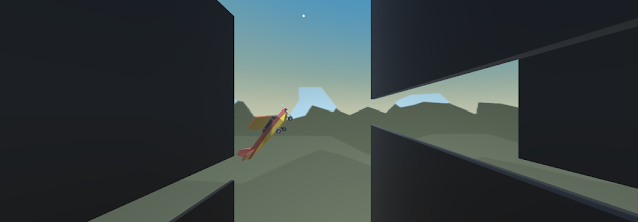
 In this unity challenge I was tasked with fixing a project which was full of missing code and bugs and I had to go through it to figure out what was wrong with it. To start the plane was going in the wrong direction so I opened up the code for PlayerControllerX and changed a line of code that made the plane go backwards. Then I had to slow down the plane so I added in the line of code Times.deltatime, which reduced the speed of the plane significantly. For the next part I had to stop the pane from tilting on its own, I got stuck on this so I opened up my Project 1 file and also looked up up online. I eventually figured out I needed to add some code to the PlayerControllerX file, which sorted the problem out. Next I had to fix the camera, so aligned it in the position I thought was right, took note of the lines of axis and opened up the FollowPlayerX file and added the coordinates to the lines of code which sorted out the camera, I also had to to drag the plane file into the the Fo...

Tutorial lesson 1.4

Image
 In this lesson I had to give the vehicle the ability to turn left and right. I did this by first adding  the code to visual studio which had allowed the vehicle to turn left and right, although it was not very fast at it and ended up looking rigid and non-realistic. Next I wanted to be able to use the keyboard to make the vehicle turn rather than using a slider, so I added the code and then was able to turn the vehicle using the arrow keys or the letters A and D. I then decided to do the same thing with the forward and backward motion of the vehicle by adding the code, then I could control how fast the vehicle was able to drive using the keys on the keyboard. Then I wanted to make the vehicles turning motion look better, I wanted it to rotate instead of slide so I replaced a piece of the code with a new piece which allowed the vehicle turn more fluid instead of just sliding in across the screen. Final I ended up just needing to clean up a few things such as the hierarchy, thr...

Game Elements

Image
From my reading of the article "What are the Qualities of Games" I believe that I have a better understanding of the makings of a game. The article goes through the talks about what exactly is needed for a game to be made, they list players, objectives (goals), rules, resources and resource management, game state, information, sequencing, player interaction, theme (narrative-backstory-setting) and games as Systems as what is needed for a game to work. Also when the article talks about critical analysis and mentions that words like fun aren't helpful but rather explaining why it is fun i.e. I enjoy this specific mechanic as it's unique and keeps with the pace of the game or something like that. https://tudublin-my.sharepoint.com The next reading piece is an article on game design research which talks about topics such as what game design actually is and how it can be transferred to articles, to talk about what is actually needed and how to include theoretical empirical...

Feedback Thoughts

Image
 The first  article that I read was about why rejection hurts us so much. I thought this was an interesting piece as it discussed how rejection in today's world is different from rejection in the past as back then it was limited to friends, dates or jobs, whereas in todays world we face rejection everyday, from social media platforms, dating apps or people who ignore our texts. I thought this was an interesting way to look at the way rejection has change with the times. When they talk about the reason why rejection hurts so bad is because it's just what our brain does, it made me wonder what other reasons do we respond to other outcomes in specific ways because our brain told us to. The mention that it stems from when we where a hunter-gather society, that how we lived in packs for survival and that rejection from the pack could mean death. It then goes on taking about how we deal with rejection in negative ways when in fact we should talk about what we can offer and how valua...