Posts

Showing posts with the label Project

Unity Tutorial (05)

Image
 In this Unity Tutorial I was tasked with creating some basic animation for the  enemy robot and for the player character Rudy. This task was on of the longer ones as it involved me going back and forth in the project window to receive the required animations from the animation folder and then add them to my project. To give an idea of what I needed to do was first take the premade animations in the folder and place them in the animator window so that I could then spread them across the frames. I repeated this process four times in total, one for each direction the robot can face. Then I wrote down some code for the the animation too and pressed play to test it out.  It worked the robot had animation when it walked. Now I needed to do the player animation which was a lot easier as most of it was already done, the only major thing I needed t do was input some code and after that it was all working, both  characters where animated and I had done what I set out to do. I...

Unity tutorial (03)

Image
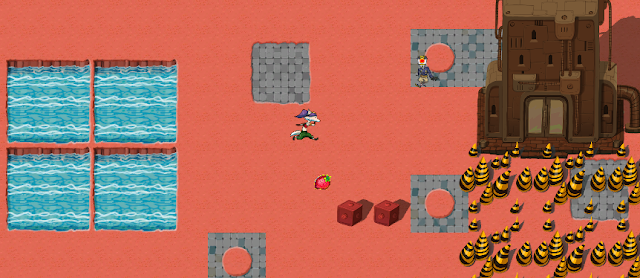
This week in my unity project I had to decorate the world of my game and include some world interactions-block movement. How I decorated the world was by first adding some metal boxes into the world, edited them so that the  pivot point was in a specific area and such, then I made it into a prefab which allowed for me to now have a finished copy of the box which I was able place as a decoration, I then adjected the box and the character so that when they interreact with one another, it would look natural rather than the character being able to move over the box without any resistant or constraints. Then how I made the world interactions was by first modifying the character controller script to tell it that the main character can collide with chosen objects, but can pass through others. An example of this is the piece of code that I wrote down making it so that all of the tiles that don't have any water on them are able to be walked on with ease, while the tiles that do have water o...

Project

Image
 This week I ended up finishing the limb movement of my project, this took a lot longer than I originally  expected as I needed to record each individual limb movement and then once that was done, adjust each part so that the limbs would move symmetrical to the opposite limb. After completing that, I focused my attention on making a useable item. I did this by first importing my chosen item (a Hurley) from blender, I then scaled and and positioned the item proportionally so that it looked natural. After that I put in the code so that it would appear in the characters hand when the pickup was activated. Then I put in the code so that the hurl would be swung like a sword or weapon. So now I had a weapon item, but I wanted to include one more thing before I went on to my next task. I wanted to include a way to shot balls (sliotars) while I was holding the hurl. So I went back to a previous unity tutorial where balls shoot out from a character and thought about how I could alter i...

Alpha

Image
So in my Game/Project I have made a staging area for me to set up any so I can run scenarios and other tasks. An example would be I created some steps which my player would need to jump to get over them so as I coded the ability to jump on my player it was able go up the stairs, such scenarios is why I made this area. Overall I have given my player the ability to jump, move in any direction without changing keys, what I mean by this is that I locked up how to make it so that when the camera follows the player it turns when the mouse/trackpad is moved from left and right and the player turns so that the camera always shows the players back. I also made it so that the camera has a cut of limit so that it can't pass a certain point on the Y-axis. Currently I am working on moving my characters limbs so when he moves it looks like he is walking, however it is talking longer than expected as I need to move each of the assets limbs individually, so I would have to move the upper arm to a ...

Game Idea Research

Image
 After thinking carefully about the choice, I have decided to choose to make a 3D platformer game. I ended up deciding to make a 3D platformer as I believed that it would be the most fun, but also the easiest for me to make as I've never made a game before and I don't want to start off with something big like an RPG that'll be to0 time consuming, also I have plenty of examples of great platformers that I can get inspiration from. In my game I plan to include specific game mechanics, which I feel are good to be in this game. My first game mechanic to include will be the ability to double jump. Most games in today's world include the ability for the character to be able to jump and then jump again while in mid-air, this has become an almost vital game mechanic as it allows players to reach areas that may seem out of reach. The double jump ability has become a staple of modern gaming, as it appears more now than maybe in the early 2000's. Another game mechanic that I w...

Game Brainstorm

Image
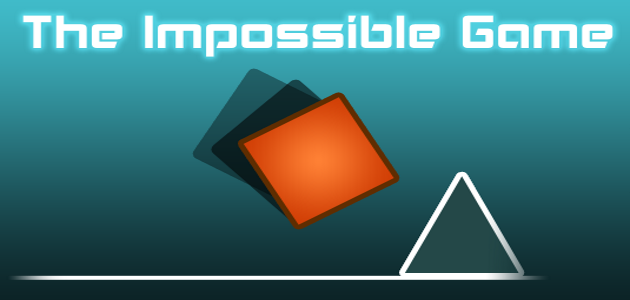
 For my brainstorming I thought back to when I was younger and played games on websites on sites like Kongregate or Miniclips , these games where very fun but also where never extremely complicated looking, usually where kept very simple. My first game idea is that of a game similar to the I mpossible game . The Impossible game was a 2D game where the player controlled a block and had the action to either jump over the obstacles of choose not  to jump as it may cause you to die if you do so. The game is renowned for being difficult (as the name tells us) and this factor will benefit me as if the game is very difficult and I am able to  imitate the difficulty, I then won't require a lot of levels in the game as if people can't get past the levels there would be no point in having loads of  levels. Now as you can see from the picture of the Impossible game, that it appears to be 2D, I however will make my game in a 3D format, so using my experience from my unity...